
Integrations
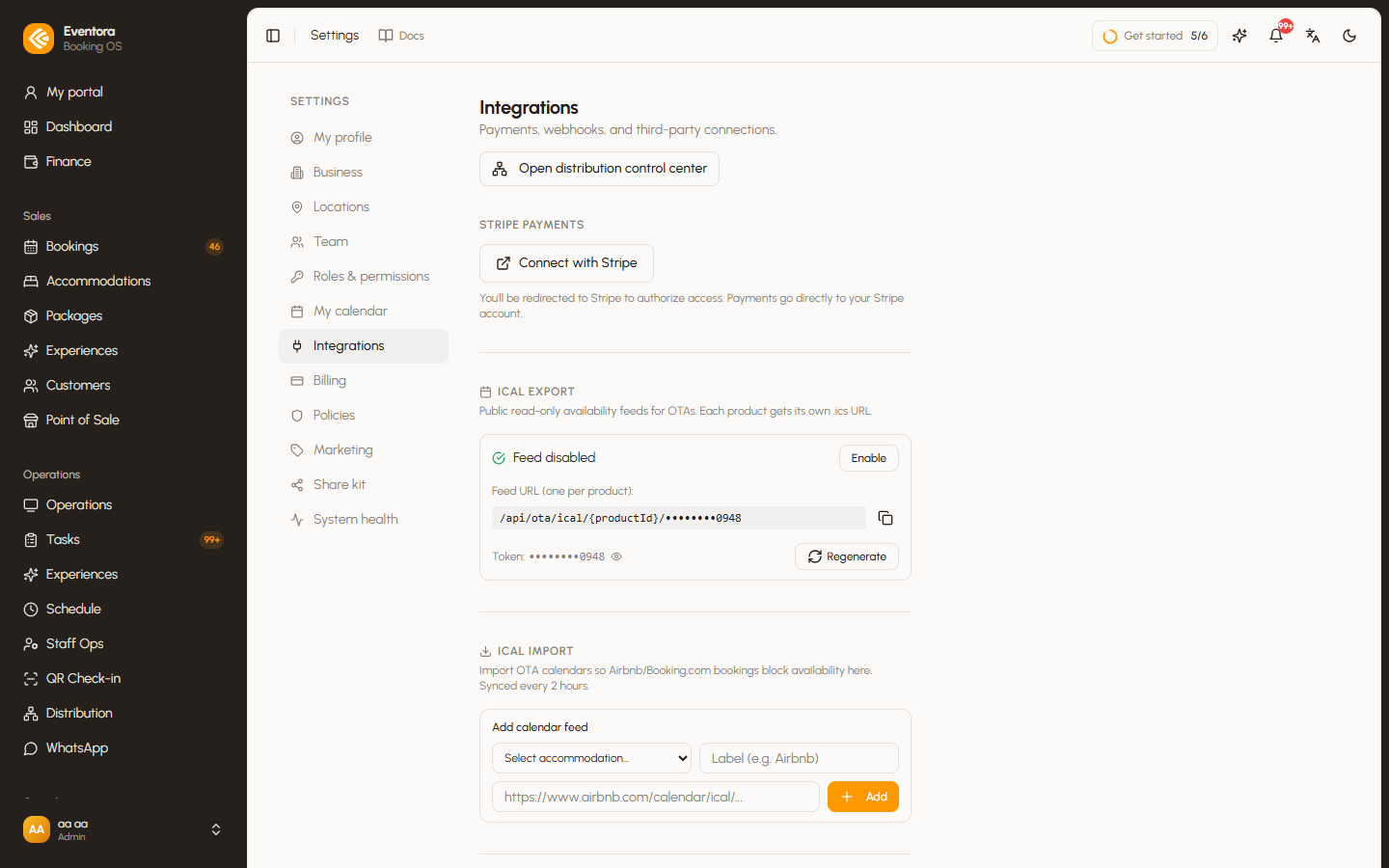
Stripe (Payment Processing)
Eventora uses Stripe to process online payments from guests. Connecting Stripe is required to:
- Accept card payments on the public booking page
- Send payment links for outstanding balances
- Process refunds automatically
Connecting Stripe
- Go to Settings → Integrations
- Click Connect Stripe
- You are redirected to Stripe's OAuth flow — log in or create a Stripe account
- Authorize Eventora to access your Stripe account
- You are redirected back to Eventora — the connection status updates to Connected
New operators: First retreat in 30 minutes.
Disconnecting Stripe
Click Disconnect to remove the Stripe connection. This disables online payment collection and payment links immediately.
Stripe fees
Stripe charges a processing fee per transaction (typically 1.4% + €0.25 for European cards, 2.9% + $0.30 for US cards). These fees are separate from Eventora's subscription and are settled directly by Stripe.
OTA Sync (Channel Manager)
Eventora supports three ways to sync availability with OTAs such as Airbnb, Booking.com, and VRBO. All are configured from Settings → Integrations.
iCal export (Eventora → OTA)
Push Eventora bookings to an OTA calendar:
- Enable iCal export on the Integrations page
- Copy the feed URL for each accommodation product
- Paste the URL into the OTA's calendar import settings (e.g. Airbnb → Listing → Availability → Import calendar)
OTAs typically poll iCal feeds every few hours. Use Channex or Beds24 for near-real-time two-way sync.
iCal import (OTA → Eventora)
Pull OTA blocks and reservations into Eventora:
- Copy the iCal URL from your OTA listing
- On the Integrations page, click Add iCal import
- Select the matching accommodation product, paste the URL, and save
- Click Sync now to fetch blocks immediately
Imported blocks reduce available capacity alongside Eventora bookings.
Channex (two-way channel manager)
For full two-way sync with Airbnb, Booking.com, and other channels:
- Click Enable Channex on the Integrations page
- Eventora provisions a Channex property and room types from your accommodations
- Map each product to its Channex room type
- Connect OTAs inside Channex, then click Sync now in Eventora
Beds24 (alternative channel manager)
If you already use Beds24:
- Generate an invite code in Beds24
- Enter the code on the Integrations page to connect
- Map Beds24 rooms to Eventora accommodation products
- Sync availability from the Integrations page
Outbound webhooks
Send your own systems a notification when things happen in Eventora, from Settings → Integrations:
- Enter the destination URL
- Pick which events to send:
booking.created,booking.confirmed,booking.cancelled,booking.checked_in,booking.completed,payment.received - Create the endpoint — the signing secret is shown once, immediately after creation, to verify webhook authenticity
Endpoints can be toggled active/inactive or deleted at any time.
Email (AWS SES)
Automated guest emails are sent via AWS Simple Email Service. Email configuration is handled at the business level — see Business Settings for sender address setup.