
AI Recommendations
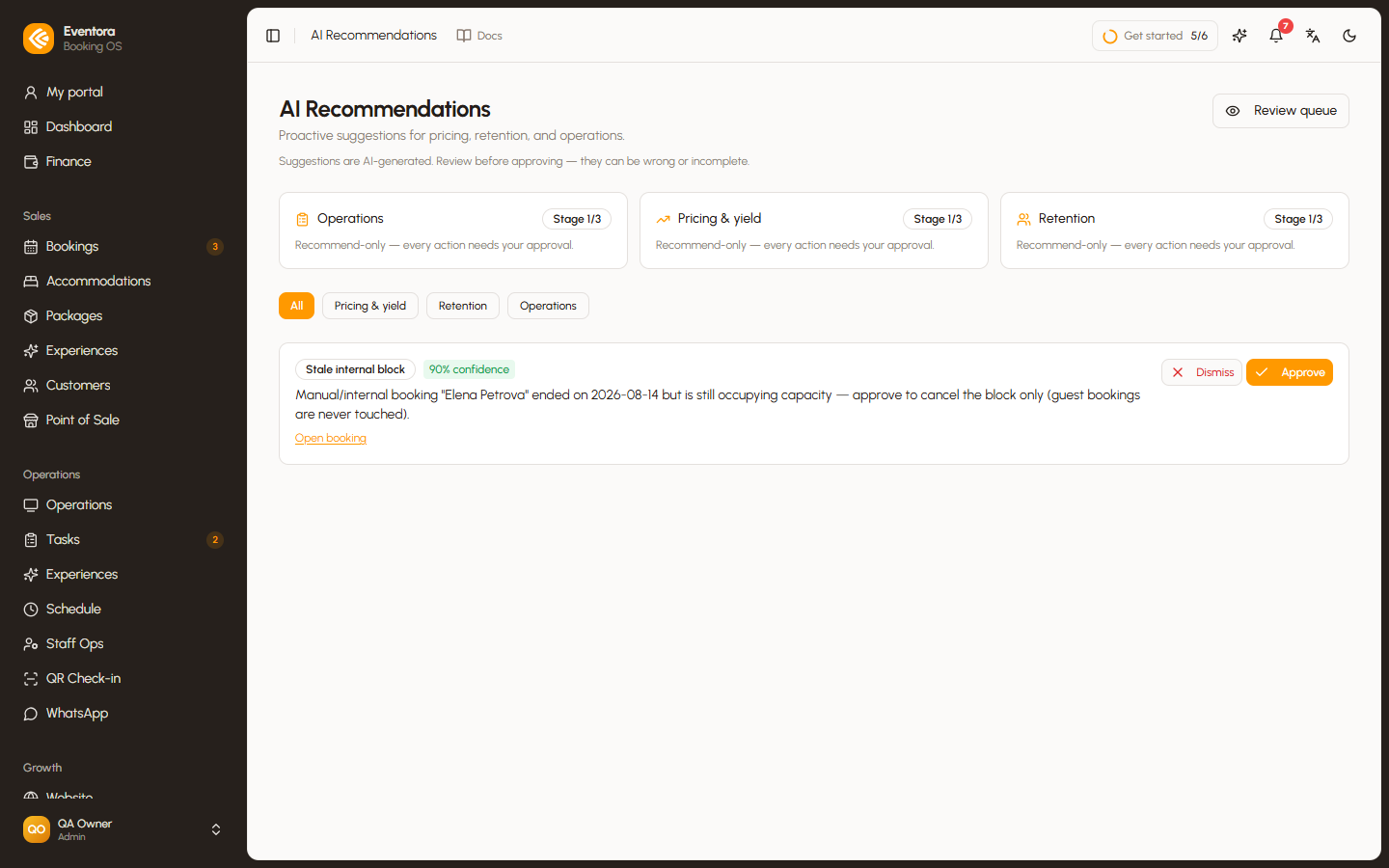
Eventora includes AI assists for operators — recommendations and messaging help so the team spends less time on repetitive work. Prompts and recommendation signals follow your vertical pack.
AI transparency (EU AI Act)
Eventora discloses AI use where guests or staff interact with AI, and labels AI-generated media in Social and the Media Library.
| Surface | What you see |
|---|---|
| Guest web chat / WhatsApp agent | First-message disclosure that the reply is from an AI assistant; staff can take over |
| Ask AI (analytics) | Panel note that answers can be wrong and may send guest data to AWS Bedrock |
| Website editor AI | Empty-state note to review generated copy/layouts before publishing |
| Social / Media Library | AI-generated badge on images and videos produced by Eventora |
| AI Recommendations | Page note that suggestions are AI-generated and need review |
Machine-readable marking: generated image/video files are tagged in storage metadata (ai-generated) and in the database (ai_generated / media_ai_generated). Full C2PA Content Credentials will be added when Bedrock or our encode pipeline supports embedding manifests (provider tooling / SynthID-style signals where available). Until then, keep the visible labels and do not strip metadata when republishing.
Operators remain responsible for platform-specific AI labeling rules when publishing outside Eventora (Instagram, TikTok, etc.).
Public site / legal: see Terms and Privacy.
Where it shows up
- AI Recommendations in Growth — suggested actions and opportunities
- WhatsApp — an AI agent that auto-replies from your catalog and booking context; your team can take over (handoff) anytime
- Analytics / Ask AI helpers where enabled
- Operations Overview — night-before run-sheet teaser when tomorrow’s brief is ready
- Staff portal → Offers — session assign offers for instructors to Accept / Decline
- Finance → Receivables — Close the week builds a prioritized collection queue
- Customers — private Guest memory after a stay is completed
- Settings → Business — optional Owner voice style for the agent
AI usage is metered by plan (token and media limits). See plan details under Billing and the pricing page on eventora.ai.
Once monthly usage crosses 80%, a usage banner appears in Ask AI and at the top of WhatsApp conversations, showing a percentage bar (it stays hidden below 80% to avoid clutter). At 100%, Ask AI stops accepting new questions, and the WhatsApp/web-chat agent automatically hands off new guest messages to a human instead of erroring out.
The platform kill-switch flag ai_agent gates the WhatsApp/web-chat agent and Ask AI. If it is off for your business, Ask AI is hidden and chat hands off instead of calling the model. Owner voice also has no effect while this flag is off.
Autonomy stages
Each domain (pricing, retention, operations) has a trust ladder:
| Stage | Behavior |
|---|---|
| 1 | Recommend only — Approve / Dismiss on every card |
| 2 | Auto-execute within daily caps (price changes and yield stay Stage 1) |
| 3 | Stage 2 plus sampled review |
Promote only when the UI shows the domain is eligible. Circuit breakers pause auto-execute if reject rate or failures spike.
At the top of the AI Recommendations page, each of the three domains (Pricing & yield, Retention, Operations) has its own status card showing a Stage N/3 badge and one of three states: a plain description of what that stage does; an Eligible for Stage N note with a Confirm promotion button once the domain qualifies; or, if a circuit breaker has tripped, a red banner with the reason and a Resume button.
Co-pilots & recommendation cards
Bedrock drafts narrative/body when quota allows; if AI quota is exhausted, structured fallback copy still appears on the card.
Every card follows the same anatomy: a category badge, a confidence badge (color-coded by score), the AI-written rationale, an optional High risk badge, a deep link to the relevant page, and Dismiss / Approve buttons — the approve label changes per action (Assign, Send, Apply scenario, Got it, or plain Approve). Pricing/yield cards that were approved keep an Undo button for 24 hours after execution.
Night-before & guest journey
| Card | Domain | What it does |
|---|---|---|
| Tomorrow's run sheet | Operations | Evening brief for tomorrow: unassigned sessions, balances, waivers, room turns. Got it acknowledges. |
| Assign instructor | Operations | Staff suggestion for an unassigned session — Assign (or Accept in the staff portal) writes the instructor. Overlap is rejected (no double-book). |
| Collect balance / Waiver reminder | Retention | Near-arrival guests with amount due or unsigned waiver — Send emails the link. Skips email if they already have an active WhatsApp/web chat (shows a staff nudge instead). |
| Check-in blocked — waiver | Operations | Created when ops tries to check in a waiver-required guest who has not signed. Approve Send to email the waiver link. |
Yield, capacity & marketplace
| Card | Domain | What it does |
|---|---|---|
| Yield scenario | Pricing | T-48h low fill (optional weather signal when enabled). Pick an alternative (e.g. flash −15%, cancel empty, wait). Apply is Stage 1; Undo within 24h for price changes. |
| Stale hold / internal / double-booked staff | Operations | Ghost capacity hunter — expire stale unpaid holds, clear stale internal blocks, or unassign overlapping instructors. |
| Instructor offer | Operations | Week-ahead match for unassigned sessions. Instructors see these under My portal → Offers and can Accept / Decline themselves. |
| Dynamic package | Pricing | Inventory skew (e.g. dorms full, privates lagging) → propose a short-lived public package. Approve creates a bookable package in Packages. |
Money close & memory
| Card / surface | Domain | What it does |
|---|---|---|
| Close the week (button) | Retention | On Finance → Receivables: prioritizes open balances, drafts dunning, flags high-risk. Opens AI Recommendations with Collect balance cards + a summary that deep-links to Exports for the period. |
| Guest memory | — | When a booking is marked completed, Eventora stores a private staff-only summary (dietary / skill / incidents) on the customer. Shown on the customer profile; injected into the agent for personalization (never on the public booking page). |
| Owner voice | — | Opt-in under Business settings. Builds a style pack from recent outbound staff replies. Used only when ai_agent is on. |
Vertical-aware signals
| Vertical | Pricing | Operations (examples) |
|---|---|---|
| Retreat / hospitality | Accommodation occupancy (forward vs baseline); yield / dynamic packages | Arrival clustering, overbooking, missing staff, low session fill, ghost capacity |
| Class | Catalog booking-demand rates | Missing instructor, low session fill |
| Appointment | Catalog booking-demand rates | Missing provider, busy-day clustering |
| Rental | Catalog booking-demand rates | Fleet pressure (equipment unavailable) |
Retention (churn / win-back / cancellation risk / close-the-week / guest journey) runs for every vertical and uses that vertical’s booking vocabulary.
WhatsApp and Ask AI use the same profile labels (guest vs client vs participant, etc.) and vertical-specific date / upsell guidance.
WhatsApp agent (what it actually does)
When a session is Active, the agent can:
- List products and check availability
- Create a booking and share a payment link
- Look up the customer’s existing bookings
- Suggest add-ons after a booking
- Hand off to a human for complaints, refunds, or anything it cannot handle
It is not a draft-then-approve inbox — replies send automatically until someone clicks Take Over. Details: WhatsApp.
With Owner voice opted in, replies follow your team’s recent outbound tone. Guest memory (if present) is used to personalize carefully — private incidents are never recited to the guest.
Related
- Automations — rule-based email / tags / stages (not AI cards)
- Staff Portal — Offers Accept / Decline
- Finance — Close the week + Exports
- Customers — Guest memory
- Business settings — Owner voice
- Playbooks: Run arrival day · Collect & close · Grow after you’re live