
Import & Export
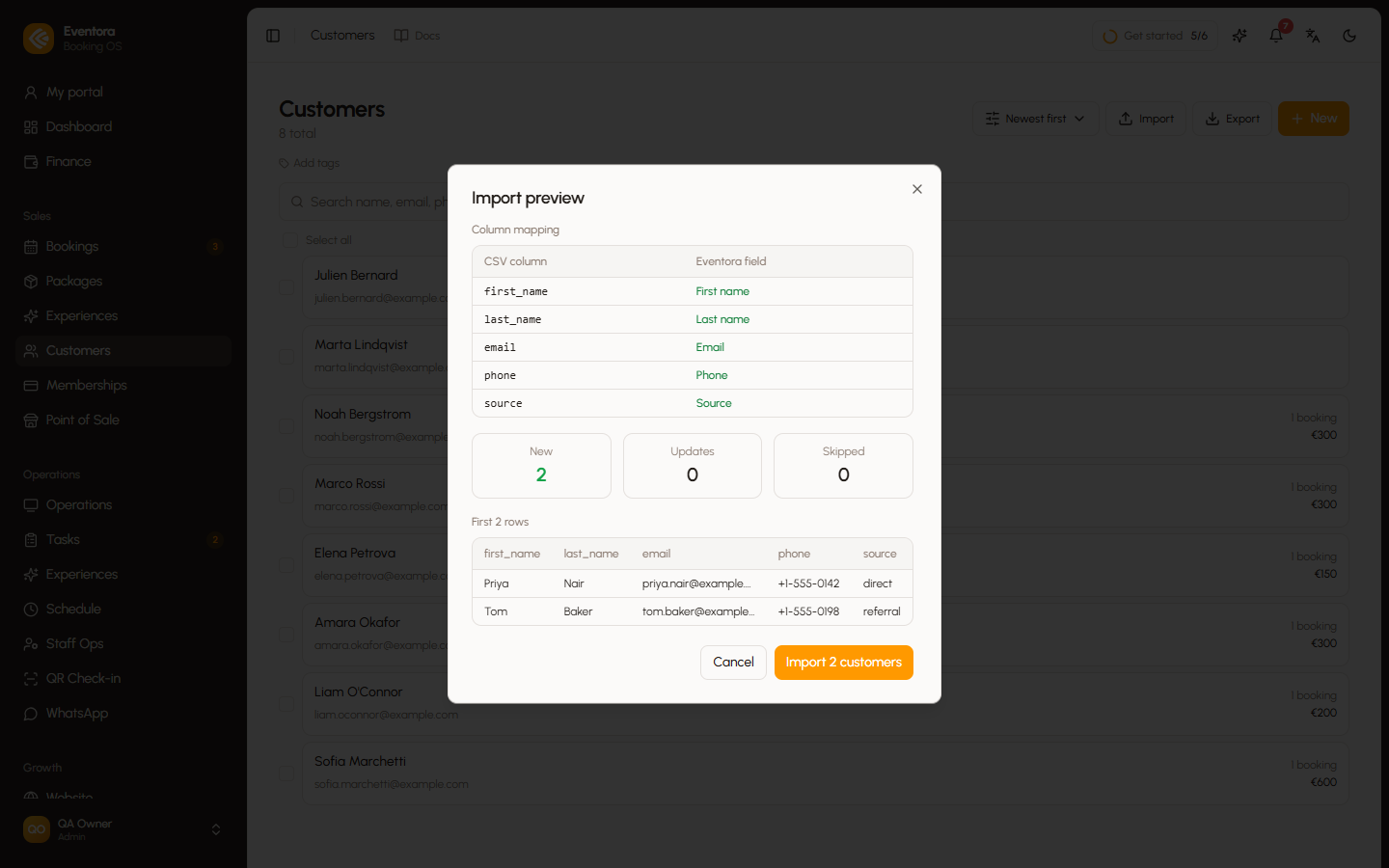
Import and export live under the Customers page header — there's no separate import/export screen.
Exporting customers
Click Export — downloads a CSV immediately with: First Name, Last Name, Email, Phone, Birthday, Nationality, Source, Tags, Bookings (count), Total Spent, Lead Stage, Lead Value, and Customer Since. It does not include notes or marketing-consent status.
Importing customers — preview, then confirm
- Click Import and choose a
.csvfile. - The file uploads to a preview step, which returns a column-mapping table, a sample of the first rows, and counts of new / updates / skipped rows — nothing is written yet.
- Review the preview, then click Import N customers to confirm. This performs the actual writes and shows a final imported/updated/skipped/errors summary.
Recognized columns
Column headers are matched case- and spacing-insensitively, with common aliases:
| Eventora field | Accepted CSV headers |
|---|---|
| First name (required) | first_name, firstname, first, or split from name/full_name/fullname |
| Email (required) | email, e-mail, emailaddress |
| Last name | last_name, lastname, last (defaults to a placeholder if absent) |
| Phone | phone, mobile, telephone, cell |
| Birthday | birthday, birthdate, dob, dateofbirth — accepts YYYY-MM-DD or D/M/YYYY |
| Nationality | nationality, country, nation |
| Source | source, channel, leadsource — must resolve to a known source value, otherwise dropped |
| Notes | notes, note, comment, comments, memo |
Only first name and email are actually required — everything else is optional. There is no marketing-consent column recognized on import; consent is never set by an import.
Import behavior
Existing customers, matched by email, are updated, not skipped — the import overwrites their record with the CSV's values. Rows are skipped only for a missing first name/email or an invalid email format.
Tips
- Clean your CSV in a spreadsheet tool before importing — remove empty rows and fix formatting
- Test with a small batch before importing your full list
- Because matching customers are updated, double-check your file's contents before confirming a re-import — a stale or wrong CSV will overwrite existing profiles
Real-world scenario
A hotel migrating from a spreadsheet uploads a 400-row export from their old PMS. The preview shows some columns mapped to "Not imported" (loyalty-tier and room-preference fields Eventora doesn't recognize) and flags a dozen rows with malformed emails. The manager fixes the emails, re-uploads, and confirms — new guests are created and already-known guests (matched by email) have their phone/nationality fields refreshed from the newer file.